Security Scans Have a History: Visibility Into Every Security Scan



Scan History provides centralized, searchable and auditable visibility across every CI repository scan, container image scan and PR/MR security check, complete with policy outcomes, scan metadata, issue summaries and downloadable reports.
Security scans shouldn’t disappear after they finish.
A build fails. A pull request is blocked. A scan produces an unexpected number of critical and high-severity findings. The result is visible, but the context behind it is often fragmented across CI logs, source control and the security platform.
Without historical scan visibility, even simple questions can take time to answer:
- Which scan produced these findings?
- Which policy caused the scan to fail?
- What repository, branch, pull request or image was scanned?
- Who or what initiated the scan?
- Are the same policies or conditions causing recurring failures?
- Are security outcomes improving over time?
As security scanning expands across repositories, PRs/MRs and container images, reconstructing this context becomes a recurring investigation of its own.
The Visibility Gap Behind Security Scan Results
Security results are often preserved without the scan context needed to understand how they were produced.
- A developer may see that a PR/MR security check failed without knowing which policy condition triggered the violation.
- An AppSec engineer may need to determine which issues or policy violations caused a CI repository or container image scan to fail.
- A platform engineer may need to confirm whether a CI security scan completed and which build initiated the scan.
Although the answers may exist across CI, source control and the security platform, teams still have to reconstruct the surrounding context after the scan completes.
How Scan History Preserves the Context Behind Every Scan
Scan History brings CI repository scans, container image scans and PR/MR security checks for open source issues (SCA) and code weaknesses (SAST) into one centralized view.
For PR/MR security checks and CI repository scans, teams can review the results of the applicable SCM or CI Open Source and Code Policies, including the conditions that triggered a violation.
For each scan, teams can review the context needed to investigate results, understand policy decisions and provide evidence for audit and compliance requirements, including:
- Policy outcome
- Scan type
- Scanned repository, container image, PR/MR
- Scan initiator
- Scan status
- Issue summary by severity
- Start and completion timestamps
- Evaluated policies and triggered violations
- Reference IDs and URLs
By preserving this context alongside scan results, Scan History enables teams to connect a failed policy check or unexpected issue summary to the scanned repository or container image and the associated PR/MR or CI execution.
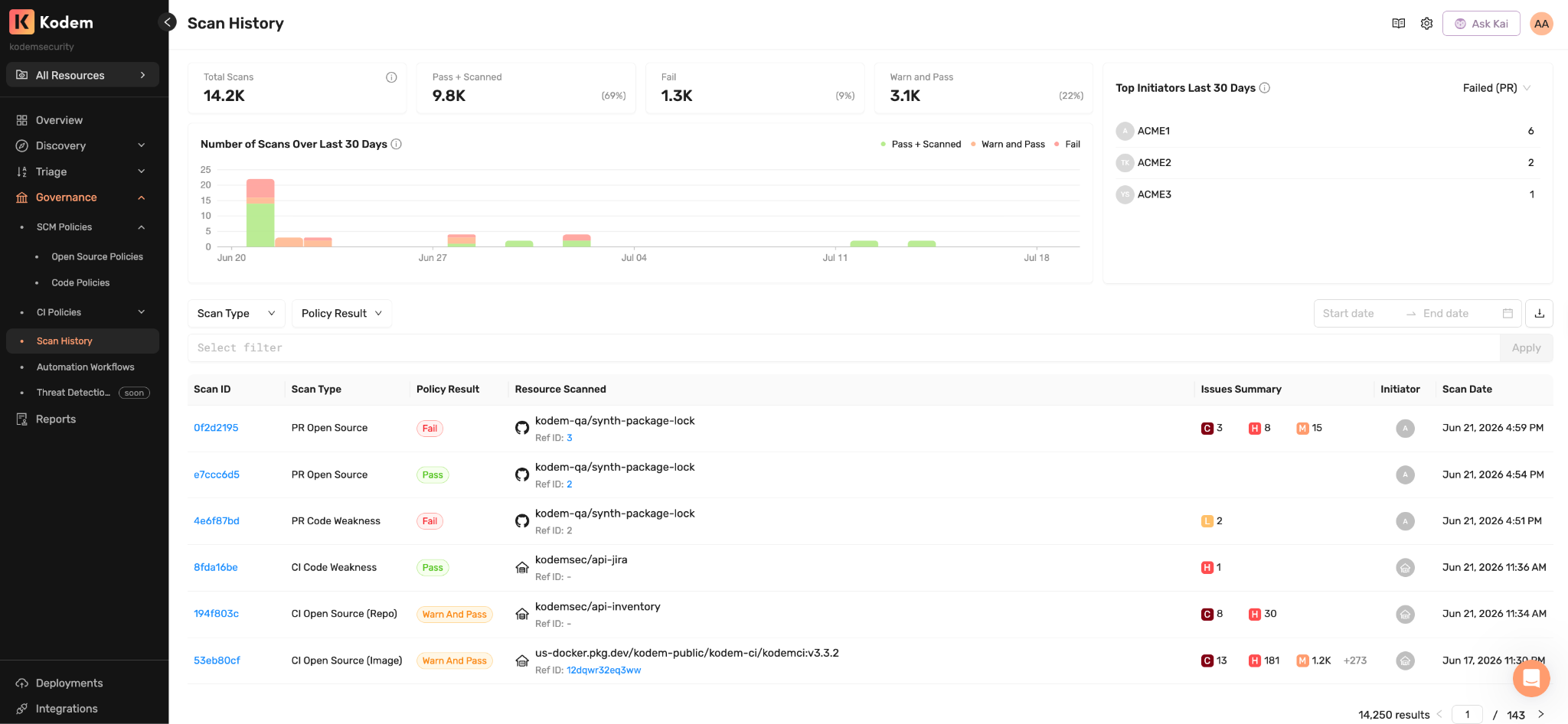
Centralized Scan History across CI repository scans, container image scans and PR/MR security checks
Investigate Individual Scan Results
When a scan produces an unexpected result, teams can begin the investigation in Scan History with the policy, issue and execution context already available.
Teams can:
- Determine whether the result reflects a failed policy check or a scan execution failure.
- Review the evaluated policies and triggered violations.
- Examine the issue summary by severity.
- Confirm the scanned repository, container image or PR/MR.
- Identify the initiator and relevant timestamps.
- Use the associated URL to open the PR/MR or CI execution.
This gives teams a direct path from an unexpected result to the policy decision, scanned resource and execution details needed to explain the outcome.
Identify Patterns in Scan Activity
Scan History also helps security teams move beyond individual investigations to understand scan activity across repositories, scan types and development teams.
Teams can use high-level metrics, search and filters to analyze scan activity across policy outcomes, scan types, resources, initiators and timeframes. They can also export Scan History to CSV for broader reporting and analysis.
This makes it easier to:
- Identify spikes in failed scans.
- Investigate recurring policy failures.
- Compare scan outcomes across repositories and scan types.
- Compare pass and fail rates across selected timeframes.
- Identify failed scans tied to AI-related package or package category conditions.
This historical visibility helps AppSec teams understand how security outcomes are changing and where policy enforcement may require further investigation.
Preserve Scan Evidence for Audit and Compliance
Security teams often need to demonstrate more than the presence of security controls. They need evidence that scans ran, policies were evaluated and results were preserved.
For an individual scan, teams can download a digitally signed PDF report containing the policy outcome, issue summary and available scan metadata. For broader release reviews, investigations or compliance requests, teams can search Scan History and export the relevant scan activity to CSV.
This gives teams verifiable scan evidence without requiring them to manually assemble CI logs, source control details and security results.
Security Scans Shouldn’t Disappear After They Finish
Scan History keeps the metadata, policy decisions and issue summaries behind each scan available for investigation, historical analysis and audit evidence. Teams can move from an unexpected result to its source without reconstructing the surrounding context across CI, source control and the security platform.
Scanning is meant to help teams investigate risk, not create another event they must reconstruct after the fact,
Frequently Asked Questions
What is Scan History in Kodem?
Scan History is a centralized record of every security scan Kodem runs across your repositories, pull requests, and container images. For each scan it keeps the operational context: when it ran, what it scanned, whether it succeeded or failed, which findings it produced, and which policies it evaluated.
Why did my build fail or my pull request get blocked?
Open the scan in Scan History. Each record shows which policy was evaluated and why a violation fired, so you can tell whether a block came from a code weakness, a dependency issue, or a changed policy threshold, without reconstructing it from CI logs.
Can I confirm whether a scan actually ran?
Yes. Scan History records the status of every scan, including failures and scans that did not complete, so you can confirm whether a CI job produced security results or silently skipped them.
Does Scan History cover container images as well as code?
Yes. It gives one consistent view of scan activity across repositories, pull requests, CI pipelines, and container images, so teams investigating different asset types start from the same record.
How does Scan History help during audits?
It provides an auditable trail showing that scans ran, policies were evaluated, and findings were produced, which supports incident reviews, release gates, and compliance evidence without assembling logs by hand.
Related blogs

AI-BOM: How to Identify, Understand and Govern AI Supply Chain Risk
Kodem AI-BOM extends your SBOM with an AI bill of materials: identify AI packages, verify runtime execution, and govern AI supply chain risk at scale.
6
.avif)
Stop the waste.
Protect your environment with Kodem.
The State of the Application Security Workflow
This report aims to equip readers with actionable insights that can help future-proof their security programs. Kodem, the publisher of this report, purpose built a platform that bridges these gaps by unifying shift-left strategies with runtime monitoring and protection.
.avif)
Get real-time insights across the full stack…code, containers, OS, and memory
Watch how Kodem’s runtime security platform detects and blocks attacks before they cause damage. No guesswork. Just precise, automated protection.