How a Trusted HTTP Client Becomes the Threat: Inside the Axios Supply Chain Attack


In the early hours of 31 March 2026, security researchers noticed something odd: two new releases of the ubiquitous axios HTTP client (versions 1.14.1 and 0.30.4) shipped with a dependency that had never appeared in the project before. Within minutes of installation the packages reached out to a command‑and‑control (C2) server, downloaded platform‑specific malware and then erased their own tracks. The infection window lasted less than three hours, yet axios is downloaded hundreds of millions of times per month, meaning a routine npm install in a CI/CD pipeline or on a developer laptop during that window was enough to compromise the host. This post, written from a security‑research perspective, reconstructs the attack timeline, explains how the malicious packages worked and offers actionable advice to help organizations detect and recover from the incident [1].
What happened
Compromised maintainer account
The attacker hijacked the npm account of Jason Saayman, one of axios’s primary maintainers, by gaining access to a long‑lived access token. The adversary changed the account email to a ProtonMail address and then used the compromised credentials to publish two new versions of axios. Unlike legitimate releases, these malicious versions were published manually with no OIDC signature and no corresponding GitHub tag or commit [1]. In other words, they looked authentic in the registry but never existed in the source code repository.
Staging the payload
Before touching axios, the attacker seeded a look‑alike dependency called plain‑crypto‑js. A clean decoy version (4.2.0) was published on 30 March at 05:57 UTC, and eighteen hours later a second version (4.2.1) appeared containing a single malicious change: a postinstall script that executes node setup.js [1]. To further hide evidence, the package includes a file called package.md containing a clean package.json stub with the version number set back to 4.2.0. After running, setup.js renames this stub to package.json, so anyone checking npm ls would see what appears to be the clean version [1].
Injecting the phantom dependency
Armed with the malicious dependency, the attacker published axios 1.14.1 and 0.30.4 in quick succession. The only substantive change to each release’s package.json was the addition of "plain‑crypto‑js": "^4.2.1" [1]. The rest of the codebase, including compiled bundles and type definitions, remained bit‑for‑bit identical to the previous clean versions [1]. Because plain‑crypto‑js was never imported anywhere in the source code, the malicious dependency is effectively a time bomb hidden in the manifest. When npm resolves dependencies, it installs the phantom package and runs its postinstall script, which in turn executes the dropper [1].
Attack timeline
The following timeline summarises how the attack unfolded. Notice how the malicious releases were pre‑staged to avoid drawing attention and how quickly the window was closed once the compromise was discovered [1]:
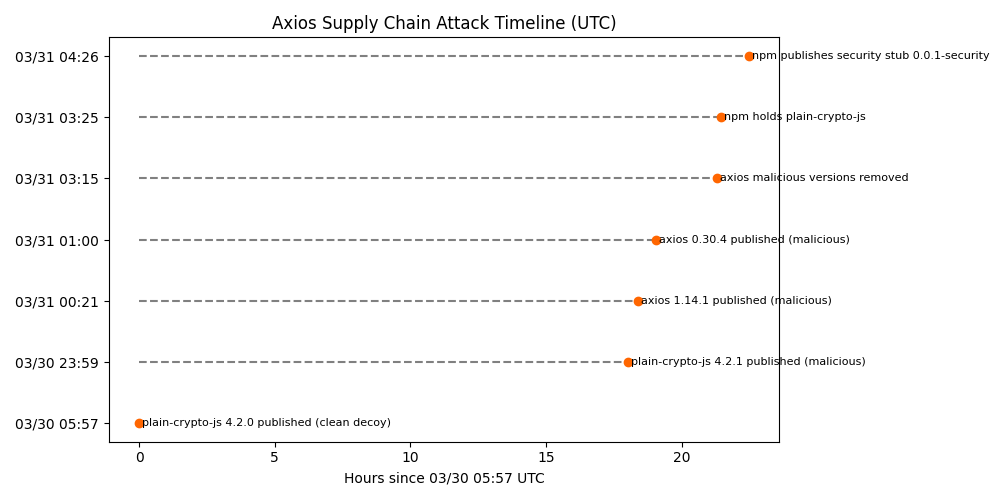
This entire attack lasted roughly four hours. Yet, because many CI/CD pipelines install dependencies on every run and because axios sits deep in many dependency trees, the impact is potentially widespread [1].
How the attack worked
Step 1 – Maintainer account hijack
By compromising the npm credentials of the lead maintainer, the attacker gained permission to publish new axios releases. The email associated with the maintainer’s npm account was changed to a ProtonMail address ([email protected]) [1]. Unlike legitimate releases published via GitHub’s OIDC mechanism, the malicious versions lack the trustedPublisher metadata and have no corresponding Git tag [1]. This subtle metadata deviation is one of the few forensic clues that something was wrong.
Step 2 – Staging the malicious dependency
The attacker created plain‑crypto‑js by cloning the legitimate crypto‑js library bit‑for‑bit and then adding only three files: a package.json with a postinstall script, a 4 KB obfuscated dropper (setup.js), and the aforementioned package.md stub [1]. Every other file is identical to the legitimate cryptographic library [1]. This copy‑paste approach ensures that diff‑based scanners see nothing suspicious beyond the scripts section [1].
Step 3 – Injecting the dependency into axios
To weaponise axios, the attacker edited only package.json in each branch. The file diff shows two changes: the version bump (e.g., 1.14.0 → 1.14.1) and the addition of plain‑crypto‑js as a dependency [1]. No source code was modified, and all other dependencies remained unchanged [1]. Because plain‑crypto‑js is never imported, its post‑install hook is the only effect. Running npm install [email protected] pulls in plain‑crypto‑[email protected] and immediately executes node setup.js [1].
The dropper – obfuscated and self‑erasing
setup.js is a minified script employing two layers of obfuscation (a reversed Base64 encoding and an XOR cipher) to hide its strings [1]. When executed, it determines the host operating system via os.platform() and constructs a command that downloads a second‑stage payload from a C2 server (sfrclak.com:8000) and executes it in the background [1]. The script uses execSync to block until the download command detaches, ensuring the installation doesn’t fail [1]. After launching the payload, the dropper deletes itself and renames package.md to package.json to hide the postinstall hook, and on Windows it leaves behind a persisted copy of PowerShell (%PROGRAMDATA%\wt.exe) for later use [1].
Platform‑specific payloads
Once the dropper runs, it reaches out to the attacker’s C2 server and downloads a platform‑specific remote access trojan. Researchers from StepSecurity and Snyk deconstructed these payloads to reveal the following behaviours [1][2]:
The RATs are fully featured: the macOS implant, for example, can download arbitrary binaries, run shell commands or AppleScripts, exfiltrate directory listings and uninstall itself [2]. Windows and Linux versions provide similar capabilities through PowerShell and Python, respectively. Each platform uses a distinct POST body when contacting the C2 server (packages.npm.org/product0 for macOS, product1 for Windows and product2 for Linux) [3], allowing the same endpoint to serve customized payloads.
Who is at risk?
Because the malicious axios versions were live for less than three hours, the primary risk is to CI/CD pipelines, developers or build systems that executed npm install during that window. Snyk notes that projects depending on @qqbrowser/openclaw-qbot or @shadanai/openclaw are also exposed because those packages vendored the malicious dependency [2]. Teams that pinned their dependencies in a lockfile before the attack are not affected; lockfiles prevented npm from fetching the new versions. Any installation of axios outside versions 1.14.1 or 0.30.4 is safe [2].
However, if you did install the malicious releases, assume full compromise. The RAT beaconed out immediately after installation and could execute arbitrary commands [1]. StepSecurity observed the malware reaching the C2 domain within seconds of installation, before npm had even finished resolving dependencies [1]. This means secrets in your build environment – API keys, cloud credentials, GitHub tokens – may already be exfiltrated [4].
Immediate response and detection steps
If your systems may have pulled the malicious packages, take the following actions:
- Stop using the compromised versions. Downgrade to axios 1.14.0 or 0.30.3 and remove any installed copies of plain‑crypto‑js. Running npm ls plain-crypto-js or searching your node_modules directory can confirm whether the package exists. A phantom dependency with zero references in the codebase is a strong indicator of compromise [1].
- Rotate all secrets used in your CI/CD pipelines and developer environments. Because the RAT harvested environment variables and credentials, assume anything accessible during the installation window is exposed [4]. Replace NPM tokens, GitHub Personal Access Tokens, cloud provider keys, Kubernetes service accounts and any other secrets.
- Audit your lockfiles and install logs. Check package‑lock.json, yarn.lock or bun.lock for references to [email protected], [email protected] or plain‑crypto‑js. grep can quickly locate these strings. For Bun users, generate a yarn.lock with bun install ‑y and test it with Snyk’s CLI [2].
- Review CI/CD network and process telemetry. StepSecurity’s Harden‑Runner flagged outbound connections to sfrclak.com:8000 from build runners [1]. Examine build logs and network flow logs for connections to that domain or unusual downloads at installation time. Look for unexpected processes executing in the background, such as osascript on macOS, cscript on Windows or python3 launched via nohup.
- Inspect for persistent artifacts. On Windows, check for the existence of %PROGRAMDATA%\wt.exe – the malicious copy of PowerShell [1]. On macOS, search for /Library/Caches/com.apple.act.mond. Deleting these artifacts and rotating credentials is critical to evict the RAT.
- Use runtime‑aware detection tools. Traditional static scanners cannot observe postinstall scripts or runtime behaviour. Tools like StepSecurity Harden‑Runner, Semgrep Supply Chain rules or Snyk’s Zero‑Day reports can detect anomalous outbound connections and flag suspicious dependencies in real time [1][2].
Why this attack matters
Rather than publishing a new typosquatted package, the attacker used a legitimate maintainer account to slip a malicious dependency into a top‑10 npm library. Because the code base was untouched, conventional diff‑based reviews and static analysis tools saw nothing unusual. The only modifications were in package.json and occurred outside of source control. Furthermore, the attack pre‑staged a clean version of the rogue package, built payloads for multiple operating systems in advance and executed them immediately after installation [1]. The operation demonstrates professional planning and reinforces that supply‑chain trust alone is insufficient.
Lessons for the ecosystem
- Harden maintainer accounts – Use hardware‑based multi‑factor authentication and enforce short‑lived tokens for publishing. In this case the attacker appears to have abused a long‑lived npm access token [1].
- Gating dependencies – Implement policies to gate new dependencies and cross‑check unused dependencies in manifests. A package present in package.json but never imported is an immediate red flag [1].
- Pin and audit versions – Lockfile‑pinned dependencies prevented many teams from installing the compromised releases. Avoid floating version ranges (e.g., ^1.14.0) in critical packages and monitor for unusual version bumps.
- Monitor runtime behaviour – Postinstall hooks run arbitrary code outside of source control. Without runtime visibility, malicious scripts can execute quietly. Tools that instrument build runners and observe outbound connections detected this incident within seconds [1].
- Prepare incident response playbooks – Have a plan for rotating secrets, auditing dependencies and communicating with stakeholders when a supply‑chain compromise occurs. The speed with which StepSecurity and the npm registry responded limited the blast radius [1].
Conclusion
The axios supply‑chain attack illustrates how quickly a widely trusted library can become a conduit for malware. By compromising a maintainer account and injecting a single phantom dependency, the attacker delivered a cross‑platform RAT that harvested secrets within seconds of installation [1]. While the malicious versions were pulled from npm within hours, the incident is a stark reminder that the trust we place in package registries and release pipelines must be matched with runtime verification and vigilant credential hygiene. Organisations should audit their builds, rotate credentials and adopt runtime‑aware tools to ensure that what executes in CI/CD pipelines is truly what they expect.
References
- Kurmi, A. (2026, March 30). axios compromised on npm – malicious versions drop remote access trojan. StepSecurity.
- Tal, L. (2026, March 30). Axios npm package compromised: supply chain attack delivers cross‑platform RAT. Snyk.
- Lakshmanan, R. (2026, March 31). Axios supply chain attack pushes cross‑platform RAT via compromised npm account. The Hacker News.
- Kodem Security Research Team. (2026, March 23). When the scanner becomes the threat: Inside the Trivy supply chain attack. Kodem.
Related blogs
JFrog Artifactory Under Attack: Affected Versions, IOCs, and the First-Hour Response Runbook
JFrog Artifactory vulnerability chain CVE-2026-82329, CVE-2026-42018 and CVE-2026-42016 reached admin in under five minutes. Affected versions, IOCs, runbook.
11


Stop the waste.
Protect your environment with Kodem.
The State of the Application Security Workflow
This report aims to equip readers with actionable insights that can help future-proof their security programs. Kodem, the publisher of this report, purpose built a platform that bridges these gaps by unifying shift-left strategies with runtime monitoring and protection.
.avif)
Get real-time insights across the full stack…code, containers, OS, and memory
Watch how Kodem’s runtime security platform detects and blocks attacks before they cause damage. No guesswork. Just precise, automated protection.